
360 Ribbon: Streamline Value-Based Care in Your EMR
Overview
360 Ribbon is a browser extension designed to support healthcare providers in managing value-based care initiatives through seamless integration with web-based electronic medical records (EMRs). Developed by Wiseman Innovations, LLC, the tool enhances clinical workflows by delivering actionable patient insights directly within the provider’s existing EMR environment. Its primary purpose is to improve patient risk scoring, close quality gaps, and support timely annual wellness visits—all critical components for success in value-based contracts.
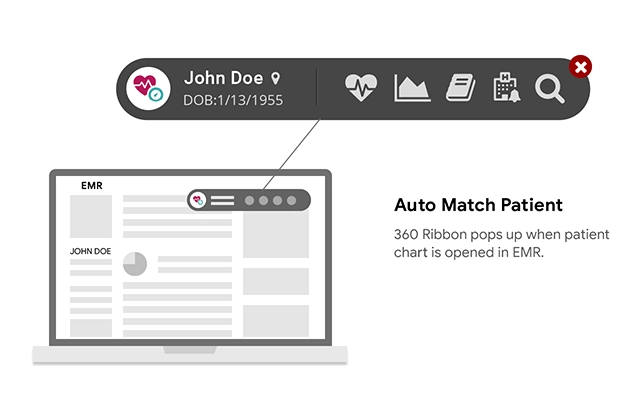
Designed for registered users of the Wiseman platform, 360 Ribbon functions as a non-intrusive ribbon that appears at the top of the EMR interface. It does not alter or restrict EMR functionality, ensuring that providers maintain full control over their workflow. The extension operates exclusively on web-based EMRs, processing only pages relevant to the integrated system. This ensures a secure, focused experience without unnecessary permissions or data access.
Real-world use cases include identifying undiagnosed chronic conditions, tracking open quality metrics per payer contract, and efficiently scheduling wellness visits. It also provides a compact view of patient utilization history across other providers and facilities, enabling better care coordination and cost awareness. The tool is especially beneficial for clinicians and care teams operating under performance-based reimbursement models.
Key Features & Capabilities
- Active Diagnosis Tracking – Helps providers ensure that active diagnoses are documented annually, which directly impacts patient risk scores and financial outcomes under value-based contracts.
- Quality Gap Identification – Displays open quality gaps based on specific payer contracts, helping providers meet performance benchmarks and avoid penalties.
- Annual Wellness Visit Support – Streamlines the scheduling and completion of patient annual wellness visits with intuitive tools and reminders.
- Compact Patient Utilization History – Offers a concise overview of patient care across other physician offices and facilities, supporting cost and utilization analysis.
- Referral Management – Enables secure patient referrals to other providers and organizations directly from the EMR interface.
These features are designed to reduce administrative burden and enhance clinical decision-making. For example, a provider can quickly assess whether a patient’s diabetes is properly documented, check for missed preventive screenings, and initiate a referral—all without leaving the EMR. The extension integrates with most web-based EMRs with minimal setup time, ensuring rapid deployment across practices.
User Interface, Workflow & Performance
The user interface of 360 Ribbon is minimal and context-aware, appearing as a ribbon at the top of the EMR screen. It is designed to be unobtrusive, allowing providers to minimize it when needed to access content hidden beneath. The layout prioritizes clarity and quick access to critical data points, with clearly labeled sections for risk scoring, quality gaps, and referral actions.
Navigating through the tool is intuitive, requiring no additional training. Since it operates as a browser extension, it leverages the existing EMR environment without introducing new workflows. The developer did not specify resource usage details, but given its lightweight nature (2.5 MB), it is expected to have minimal impact on browser performance. Stability is maintained through strict data processing boundaries—only pages tied to integrated EMRs are processed.
Performance observations are based on general software behavior patterns. The extension does not require high CPU or RAM usage, and its operation is optimized for real-time access to patient data without lag. No known conflicts with standard EMR functions have been reported.
Compatibility & System Requirements
360 Ribbon is compatible with Windows and Mac operating systems, ensuring broad accessibility for healthcare providers across different devices. It is designed as a Chrome extension, meaning it runs within the Google Chrome browser environment. The installation size is 2.5 MB, indicating a lightweight deployment.
Exact system requirements were not listed. The developer did not provide additional system requirements. Compatibility with web-based EMRs is supported across most platforms, with integration achievable in minimal turnaround time. For desktop-based EMRs, a separate window application is available upon request, though specific technical details were not provided.
Providers must be registered users of the Wiseman platform to use the extension. Access to the tool is not available to unregistered users, ensuring secure and controlled usage.
Pros and Cons
Pros
- Seamless integration with most web-based EMRs
- Free to download and use
- Minimal system resource usage
- Enhances value-based care performance
- Non-intrusive interface that can be minimized
Cons
- Only available for Chrome browser
- Requires registration with the Wiseman platform
- Not compatible with desktop-based EMRs without additional software
- Limited to web-based EMR environments
- No public performance benchmarks or user statistics
FAQ Section
Is 360 Ribbon compatible with all web-based EMRs?
360 Ribbon is designed to integrate with the majority of web-based EMRs. Integration can be achieved with minimal turnaround time, though compatibility depends on the specific EMR’s architecture and API access.
Is 360 Ribbon safe to use with patient data?
The extension only processes web pages specific to integrated EMRs and does not use explicit permissions. It does not store or transmit patient data beyond the scope of the current session, ensuring a secure environment.
Can I use 360 Ribbon without being registered on the Wiseman platform?
No. Access to 360 Ribbon requires registration with the Wiseman platform. The tool is not available to unregistered users.
Does 360 Ribbon work on desktop-based EMRs?
While the browser extension is limited to web-based EMRs, a separate window application is available for desktop-based EMRs. Contact Wiseman Innovations, LLC for access and setup details.
How often does 360 Ribbon update?
Update frequency is managed by the developer. The latest version is available through the Chrome Web Store. Users are encouraged to keep the extension updated for optimal performance.
Final Thoughts
360 Ribbon offers a focused, lightweight solution for healthcare providers navigating the complexities of value-based care. By delivering real-time insights into risk scoring, quality metrics, and patient utilization, it empowers clinicians to make informed decisions at the point of care. Its seamless integration with web-based EMRs and minimal system impact make it a practical tool for practices aiming to improve performance under performance-based contracts.
While it is limited to Chrome and requires platform registration, its benefits in workflow efficiency and care coordination are significant. The free availability and straightforward deployment further enhance its appeal. For providers committed to optimizing outcomes and financial performance, 360 Ribbon is a valuable addition to their digital toolkit.
Download 360 Ribbon now







